 Paneshot
Coding agentsPro
Send a capture to Claude Code, Codex or any open app from one list. Or let an agent capture and read windows itself.
Included in Pro. See Free and Pro
How to use it
- Open Preferences, choose Workflows and add a Send to action. Leave it on Ask each time. Paneshot needs the Accessibility permission to press the paste key.
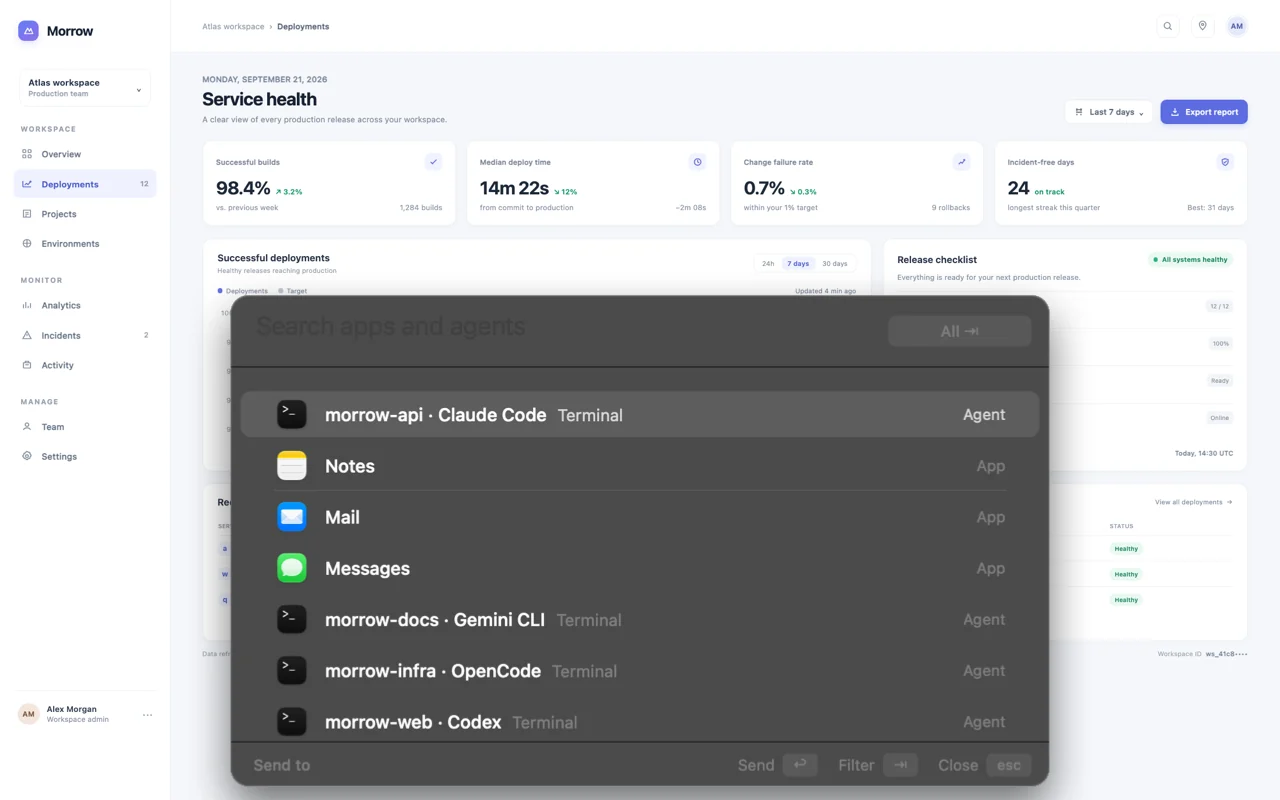
- Capture as usual, then press Return to run your default workflow, or Command-Return to choose one. A list opens with your running apps and agents. Type to search, and press Tab to switch between All, Agents and Apps.
- Pick an agent. Paneshot saves the capture in that project’s
.paneshotfolder, brings the agent’s window forward and pastes the file. Pick an app and it gets the image instead. - To let an agent capture for itself, switch on Let AI agents use Paneshot. It copies the setup for Claude Code and the JSON that other agents read.
Where to find it
Preferences, then Workflows for Send to, and Preferences, then Advanced for Let AI agents use Paneshot.
Good to know
- Paneshot recognises Claude Code, Codex, OMP, Gemini CLI and OpenCode from their running processes. Other agents are not listed.
- The
.paneshotfolder has its own.gitignore. Captures older than 24 hours are deleted the next time you send one. - Image paste depends on the agent and its terminal. It is reported to be unreliable in tmux and does not work over SSH.
- An agent can list windows, capture one, read text, tables and code, find text, compare captures and redact. Whatever it receives goes wherever that agent sends it, such as a cloud model.
Related tools
- Automatic copyOrdinary captures are on your clipboard the moment you take them. Edits, boards and imported images wait until you choose Copy, Save or drag.
- Pin to ScreenProKeep a screenshot floating above your windows while you work.
- Capture WorkflowsProChain actions such as frame, copy, save and send to an app or coding agent. Press Return in the Tiny preview or Editor to run it.
- Shortcuts ActionsProTake, read, redact and save captures from the Shortcuts app, Spotlight and your own automations.